
Planning and cost · Planning guide
What does a WordPress-to-Astro rebuild cost?
Build a useful WordPress-to-Astro budget with a free scope and cost worksheet. Include the rebuild, retained WordPress costs, and 12 months of ownership.
On this page
At a glance
- Ask for a price against layouts, features, editing tasks, and launch checks. A page count cannot describe all of that work.
- Keeping WordPress means budgeting for its hosting and maintenance as well as the new public website.
- The worksheet keeps unknown amounts blank so a partial subtotal cannot pass for a finished budget.
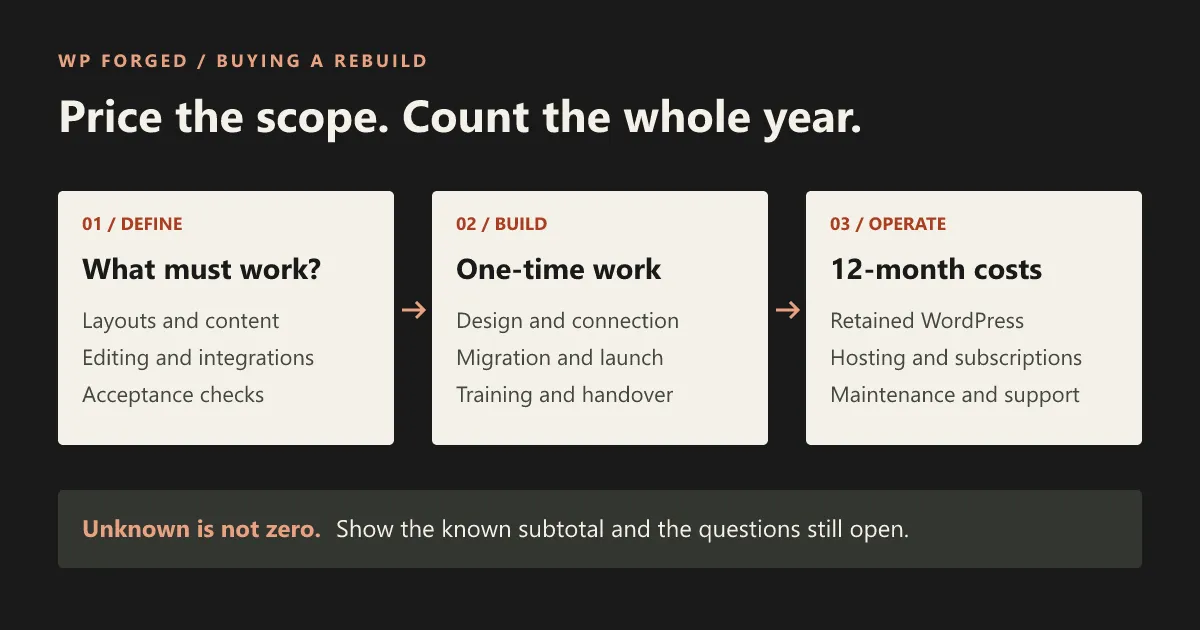
A WordPress-to-Astro rebuild needs a price for two things: changing the website and looking after the resulting setup. If WordPress stays as your editor, its costs stay in the budget too.
At WP Forged, we quote a fixed project price after reviewing the site and agreeing the work. We do not have a published starting price. Until the layouts, integrations, and editing requirements are known, a number would leave too much room for different interpretations.
You can still prepare a useful budget now. List the work, gather the costs you know, and make the unknowns visible. The worksheets below are designed for that conversation, including when you are comparing other providers.
Download the worksheets
The files are free to use and need no email address. Open the CSV files in your spreadsheet application and save an editable copy.
- Scope worksheet (CSV): the templates, features, and decisions that need a price.
- 12-month cost worksheet (CSV): one-time and recurring charges, with unknown amounts left blank.
- Instructions and calculation checks (Markdown): how to choose the budget window, calculate totals, and avoid counting a bundled charge twice.
The cost file is a blank working table, not a calculator with hidden assumptions. You supply the amounts, number of payments, and evidence. An optional spreadsheet formula is in the instructions.
Describe the work before counting the pages
“Rebuild our website” could mean recreating a design, replacing a publishing system, cleaning up years of content, or doing all three. Those are different commitments.
Begin with representative pages and the tasks behind them. If service pages share one layout, record that relationship. If one page contains a booking flow and several external services, record those separately.
| Scope question | What a provider needs to know |
|---|---|
| Which layouts are different? | A typical service page, article, archive, landing page, and any exceptions. |
| What is changing visually? | Existing design to preserve, redesign work to agree, and mobile interactions. |
| What content needs attention? | Reusable text and media, missing material, broken formatting, and fields that need restructuring. |
| What must visitors be able to do? | Send a form, search, book, donate, sign in, or complete another important task. |
| What must editors be able to do? | Create a page, rearrange approved sections, preview a draft, schedule a post, or update shared information. |
| What must survive launch? | Important URLs, metadata, downloads, integrations, analytics, and agreed accessibility requirements. |
Do not ask an owner to discover every plugin dependency alone. A useful first pass is a URL and a plain description: “This form adds the person to our mailing list and sends our team a notification.” The technical review can establish how it works today.
Our compatibility notes explain which parts may be reused and which need a closer look. For builder-specific work, start with the migration guide for your builder.
Keep the build and the running costs separate
A headless setup separates content management from the public website. Astro’s WordPress guide describes WordPress supplying content through an API; that connection is part of a project, not a replacement for all the software running the original site. Astro’s WordPress integration guide.
Your budget therefore needs more than an Astro hosting line.
| One-time work | Costs that may continue afterward |
|---|---|
| Discovery, design, templates, and content mapping | WordPress hosting, backups, and updates |
| Preview, publishing, and feature integrations | Public-site hosting and any usage charges |
| Content cleanup and asset preparation | Retained plugin or third-party subscriptions |
| URL mapping, checks, launch, and handover | Monitoring, support, and agreed maintenance |
| Training and an agreed transition period | The team’s time making and reviewing changes |
Not every project needs every line. A proposal should say which charges it includes. If hosting is bundled into care, do not count the same hosting again as a separate expense. A plugin licence can be removed from the future budget only after its remaining responsibilities have been checked.
The spreadsheet includes a row for overlapping services during the move. Keep that separate from steady-state running costs: old and new hosting may both need to stay active while the replacement is reviewed.
Compare the same 12-month window
Choose a start date and an end date exactly 12 months later. Use the same dates for each option. For an early project decision, starting at project commencement captures the transition as well as the new site’s operation.
For each charge, record the amount per payment multiplied by the number of payments due inside that window. A monthly subscription might run for only part of the period if the new service starts after launch. An annual renewal is a payment when it falls due; do not multiply it by 12.
Keep taxes and currency consistent. If you must compare different currencies, record the conversion source and date in your own copy instead of silently combining them.
The result is a cash budget for the stated window. A subscription paid before the window may still be necessary even though no new payment falls inside it. Record its coverage and next renewal in the notes. This prevents a temporarily prepaid service from looking permanently free.
Show three things next to the total:
- The known cash subtotal.
- The required items that still lack a price or payment schedule.
- Commitments that fall outside the window, such as a later renewal or support agreement.
An empty amount means unknown, not zero. Only enter zero when you have confirmed there is no additional charge. A provider can then see which questions prevent the budget from being complete.
Count your team’s work without disguising it as a supplier bill
Someone will gather content, check layouts, try the editor, and approve the launch. That effort belongs in the decision even if no new invoice is raised.
Record the tasks and estimated hours separately. If your organisation has a way to value that time, use its own rate. Do not borrow a made-up hourly rate to make one option seem cheaper.
Ask who handles content cleanup and who signs off the replacement. A proposal that leaves those tasks with your team may be entirely reasonable, but it should not be compared with a proposal that includes them without noting the difference.
A filled-in scope example, with the price left open
Suppose a small organisation publishes workshops. The following is an illustrative planning example, not a client project or a tested integration.
| Requirement | A useful scope statement |
|---|---|
| Workshop pages | Editors enter the title, date, location, image, description, and booking link using agreed fields. |
| Homepage listing | Published upcoming workshops appear in the listing; the rules for past or cancelled events are agreed. |
| Review | A reviewer can inspect an unpublished workshop through a private preview. |
| Booking | The existing booking provider remains responsible for bookings; its link or embed must work on the replacement. |
| Handover | An editor creates a new workshop and the team checks the page and listing before accepting the work. |
This example produces useful pricing questions: are those fields already available, how does the listing work now, and what preview connection is needed? It does not establish a project price. Your copy of the scope worksheet has space for your answers and unresolved dependencies.
Ask for comparable proposals
Give each provider the same requirements and ask them to identify assumptions, exclusions, recurring charges, and work they need to investigate before fixing the price.
Compare a rebuild with the credible alternative: repairing or maintaining the current site. Include the current site’s real costs and the repairs it needs. Do not compare a fully maintained new setup with an old site assumed to receive no maintenance.
The architecture decision guide helps you decide whether a rebuild addresses the underlying problem. The project brief and acceptance checklist turn those requirements into something providers can quote.
Bring the unknowns to the conversation
You do not need a finished budget to discuss the work. Send us the site URL, what you want to keep, and the costs or requirements you cannot yet estimate. That gives us a starting point for deciding whether our WordPress-to-Astro rebuild service fits.
Frequently asked questions
Does WP Forged have a fixed price?
We quote a fixed project price for an agreed written scope after reviewing the site. There is no published starting price. Hosting, paid tools, and ongoing support are identified separately in the proposal.
Does cheaper Astro hosting mean the rebuild pays for itself?
Not by itself. Include the rebuild, the retained CMS, integrations, maintenance, and the work your own team does. Compare those costs with a realistic option for maintaining or repairing the current site.
Can I use the worksheet before I have any quotes?
Yes. Fill in the scope and known subscriptions, leave unknown amounts blank, and use the remaining rows as questions for providers. The result is a partial budget until the required unknowns are resolved.