
Planning and cost · Planning guide
Write a WordPress rebuild brief providers can quote
Use a free project brief and acceptance checklist to explain your WordPress rebuild, compare proposals, and agree what must work before launch.
On this page
At a glance
- Describe the problem, the work your website does, and the parts you need to keep before prescribing a platform.
- Give providers the same requirements so price differences can be explained by scope and assumptions.
- Agree how important tasks will be checked, who accepts them, and what happens to unresolved issues.
A useful rebuild brief explains what must improve, what must survive, and how you will decide the work is finished. You do not need to know how to code the replacement.
The aim is to give providers enough shared information to make their proposals comparable. A polished design and an attractive price tell you little if one proposal includes content migration, forms, and publishing while another assumes your team will arrange them.
Start with the template, fill in what you know, and leave the technical unknowns as questions.
Download the brief and acceptance checklist
- WordPress rebuild project brief (Markdown): an editable document you can open in a text editor or copy into your usual document tool.
- Rebuild acceptance checklist (CSV): a spreadsheet of requirements, expected results, evidence, and sign-off decisions.
Both are free and ungated. They are working documents, not a legal agreement or a promise that every project needs the same features. Remove what is irrelevant and add the tasks your business depends on.
Start with a problem someone recognises
“We need a modern website” leaves a provider guessing. Describe the problem in the language your team uses.
For example: “Our marketing team needs a developer to publish every new service page” identifies an editing problem. “Visitors abandon the enquiry form on phones” identifies a visitor task worth investigating. Neither statement proves that replacing WordPress, the theme, or the hosting is the right answer.
Record the evidence you have: a difficult task, an affected URL, feedback from users, or a dated measurement. Say when a concern is a suspicion. The WordPress architecture decision guide explains when a smaller repair is worth considering.
Then name the person who can make scope decisions. A project can have several reviewers, but the provider needs to know who resolves conflicting requests and accepts the result.
Describe the site through representative tasks
Give the provider examples of each important page type and the work happening behind it. The navigation menu alone will miss things such as campaign pages, downloads, form destinations, and scheduled content.
| Area | Information to put in the brief |
|---|---|
| Design | What should stay, what should change, and which mobile behaviours matter. |
| Content | Page types, reusable fields, archives, media, and material needing cleanup. |
| Visitor tasks | Enquiries, bookings, donations, search, purchases, downloads, and any logged-in work. |
| Editing | Who creates content, who reviews it, and which content or layout changes must be possible without a developer. |
| Connected services | Where form data goes, where bookings happen, and who controls the relevant accounts. |
| Launch | Important old URLs, analytics, approvals, timing dependencies, and the person responsible for the switch. |
Link a representative page and describe its behaviour. You can write “The form sends a confirmation to the visitor and creates a record in our CRM” without prescribing how that should be implemented.
Do not put passwords or confidential customer records in the brief. Identify the account owner and arrange necessary access separately.
Specify editing freedom in concrete terms
“Keep WordPress” is a starting point, but it does not tell a developer which controls your team needs. With a separate Astro frontend, WordPress can provide content while the public layouts are implemented elsewhere. The connection itself does not reproduce your page builder. Astro’s WordPress guide.
Choose examples your editors will actually need: replace an image, add a workshop, create a service page from an approved template, reorder a group of sections, or create an entirely new layout. These are different levels of control.
Write down who performs the task and who approves publication. Ask the provider to identify any part that will still need development. Our next-edit article helps you work through those everyday decisions; this brief is where you record the agreed requirements.
Turn a requirement into something you can accept
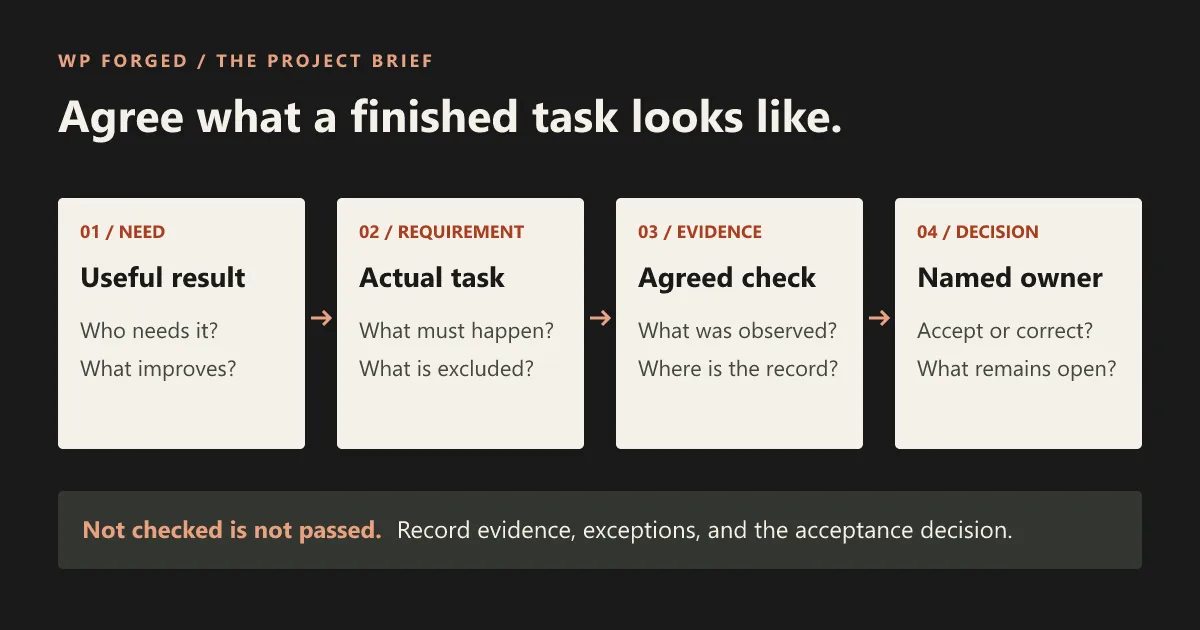
A good acceptance check names an action and an observable result. “Works well” and “SEO friendly” do not tell either side what to check.
Here is a completed illustrative requirement, created for this guide. It is not a record of a completed project or test.
| Field | Example entry |
|---|---|
| Business need | An editor can add a workshop without asking a developer. |
| Requirement | Create a workshop with its title, date, image, description, and booking link. |
| Review step | A reviewer sees the unfinished page privately before publication. |
| Acceptance action | The editor creates a new workshop on the preview site and the reviewer follows the review process. |
| Expected result | The published workshop has the entered content and appears in the intended listing; the booking link reaches the chosen provider. |
| Evidence to collect | Page/listing URLs, a record of the private-preview check, and the observed publication result. |
| Decision owner | The organisation’s named content owner. |
| Current status | Example only; no test performed. |
Your own checklist should include failure behaviour where it matters. If a form cannot deliver a message, what will the visitor see and how will the team recover it? If publication fails, who learns about it? Ask for the answer before launch rather than discovering it when someone needs help.
The downloadable checklist includes suggested checks with their evidence fields blank. “Not checked” remains different from “passed.” An exception needs an owner and an explicit acceptance decision, not an empty cell that everyone interprets differently.
Include existing URLs and accessibility expectations
Tell the provider about pages people already reach through search, bookmarks, emails, and other sites. Include useful downloads too. If addresses are changing, require a reviewed mapping and appropriate checks; keeping the design does not preserve the old links by itself. Google’s site-move guidance.
For accessibility, identify the requirements your organisation must meet and the people and tasks the site must support. Ask the provider how they will evaluate the agreed scope and record unresolved issues. An automated score is one input, not a complete evaluation. W3C’s accessibility evaluation guidance.
Where specialist legal, security, or accessibility review is needed, name that reviewer and the point at which their decision is required. The project brief helps coordinate that work; it does not replace it.
Ask providers to show the boundaries of their proposal
Request the same response structure from each provider:
- The proposed approach and why it addresses the stated problem.
- Deliverables tied to your requirements, with assumptions and exclusions.
- Work and access required from your team.
- One-time charges, recurring charges, and how changes to scope are handled.
- Review stages, acceptance checks, and any unresolved investigation.
- Ownership of code, content, domains, accounts, and documentation.
- Maintenance responsibilities and the support terms being offered.
Use the cost worksheet to compare equivalent periods and scope. A lower quote can be a good choice, but first establish whether it leaves more work with your team or excludes a feature another quote includes.
Agree the handover before development starts
Name who will maintain WordPress, the public website, forms, hosting, and any remaining paid tools. Record who can deploy, recover a previous version, and access the relevant accounts.
Agree which issues block launch and which may be accepted for later work. The final handover should identify what was checked, any limitations you accepted, and what remains open. Do not call an untested task complete because a page looks finished.
If you are considering our WordPress-to-Astro service, send us the website and the decisions your brief has not yet resolved. A partial brief is enough to make the first conversation more useful.
Frequently asked questions
Do I need to write a technical specification?
No. Start with the business problem, example pages, editing tasks, and important integrations. Mark technical unknowns for the provider to investigate rather than guessing at an implementation.
Is this an RFP or a contract?
It is an editable project brief that can support a request for proposals. It helps organise scope and acceptance criteria; it does not replace a contract or your organisation's procurement and legal review.
Should we require Astro in the brief?
If that is already an informed decision, state it and explain why. Otherwise describe the result you need and ask providers to explain their proposed approach, including whether repairing the current site would be sufficient.