
Choosing an approach · Decision guide
Keep WordPress, go headless, or leave it?
Compare repairing WordPress, exporting static pages, rebuilding with Astro, or moving to another editor. Choose around publishing, features, and maintenance.
On this page
At a glance
- Headless describes the connection between the CMS and the public site. Static describes when pages are generated; a site can be both.
- Start with the problem and the people making future edits. A repair may be enough.
- Every option needs a plan for forms, publishing, old URLs, and maintenance.
If your WordPress website is causing trouble, examine the options before committing to a rebuild: repair it, export its public pages, keep WordPress with a new frontend, or move to another content and editing system.
Start with the problem and the people who will update the result. A different framework is useful only if it helps those people and the visitors using the site.
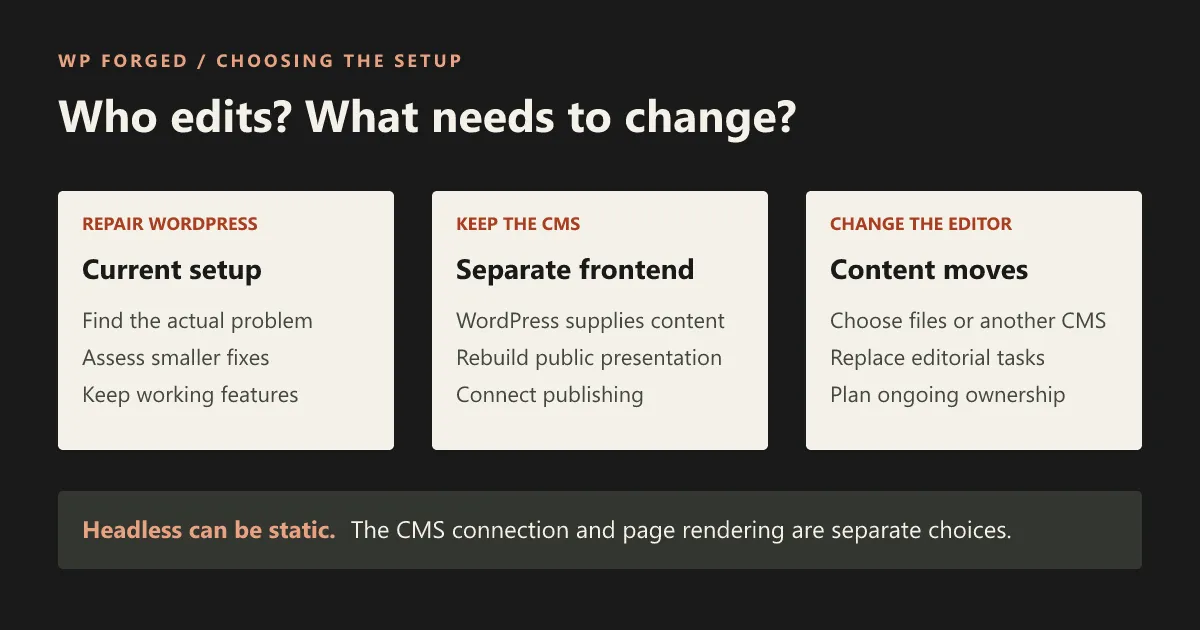
There is also a naming trap to clear up early: headless and static are not competing choices. Headless describes a CMS connected to a separate public frontend. Static describes pages generated in advance. An Astro website can use WordPress as a headless CMS and still generate static pages.
Separate the editor from the public website
On a conventional WordPress site, WordPress and its theme present the website as well as managing its content. A headless arrangement gives the public presentation to another application. WordPress supplies the content through an API, a connection that lets software request information. WordPress’s REST API is intended to support this kind of access. WordPress REST API handbook.
Astro is one option for building that separate frontend. It can also use content from files or other content systems. “WordPress to Astro” therefore needs a second sentence in any proposal: will WordPress still be the editor? Astro’s WordPress guide.
| Choice | Where editing happens | Main work to evaluate |
|---|---|---|
| Repair the current WordPress site | Existing WordPress tools, with any agreed changes | Diagnose and fix the problem; maintain the current theme, plugins, and hosting. |
| Export the existing WordPress site | WordPress, retaining the source layouts and supported editing tools | Export and deploy the page output; connect working features and verify that updates reach the public copy. |
| Keep WordPress with a separate frontend | WordPress content tools connected to new public layouts | Rebuild presentation and integrations; connect editing, preview, publication, and recovery. |
| Move content out of WordPress | Files, another CMS, or a maintained editing service | Migrate content and features; replace the editorial workflow; retire WordPress only when its responsibilities are covered. |
Moving to another editor can use Astro too. It does not automatically mean editing code by hand, but you must choose and pay for a real way to make changes. A website generated by an AI tool still needs that decision.
First ask whether the current site can be repaired
Name the symptom precisely. Is the WordPress editor slow, a public page slow, content hard to organise, or the team unable to create the layouts it needs? Those problems may have different causes.
For a slow public page, examine the actual bottleneck before changing platforms. WordPress’s own optimisation guidance covers hosting, caching, images, plugins, and other factors. Those are legitimate repair paths, not obstacles to get past before selling a rebuild. WordPress optimisation guidance.
Ask a provider to explain what they found, which smaller changes could help, and what limitation would remain. If an oversized image or a failing external script is the main problem, copying it into a new stack will not resolve the underlying issue by itself.
A repair is worth serious consideration when the editing model works, the important features are supported, and the problem is bounded. A rebuild becomes more relevant when the required design, content structure, or recurring work no longer fits the current setup. Compare both against the same requirements and ownership budget.
What about exporting the current WordPress site as static pages?
A static export is another way to keep WordPress. The source site still uses WordPress, its theme, and relevant plugins to produce pages. An exporter collects the public output and assets and publishes a separate copy. Simply Static, for example, documents crawling the source site and pushing its pages and files to a configured destination. Simply Static’s publishing documentation.
This differs from rebuilding templates in Astro and filling them with content from the WordPress API. An export starts with the existing page output. An Astro rebuild gives the presentation a new implementation. If you like the current design and editing controls, export is worth assessing before paying to recreate them. It can also retain the source page’s browser scripts and design limitations; exporting does not itself redesign or simplify them.
Forms and search need a working arrangement, but they are not universally unavailable. Simply Static Pro documents form connections through webhooks or embedded live forms, and its documentation covers search integrations. The appropriate choice depends on the actual feature and licence. An embedded WordPress form still needs its source to be reachable. Simply Static forms, search documentation.
Ask how a content update triggers an export, how failed publication is detected, and what happens to scheduled or deleted content. Plan authenticated, personalised, and transaction-based features separately: a copied public page does not reproduce their server-side behaviour. Test the required tasks on the exported site before choosing this route, and retain maintenance for the WordPress source and any live services it uses.
Keep WordPress when its editing work is valuable
WordPress may already organise your content, media, accounts, and editorial process in a way the team understands. Replacing those habits has a cost even when exporting the text is straightforward.
A separate frontend can make sense when you want to keep that content system while rebuilding public layouts and behaviour. It also creates an integration to maintain. Your developer needs to determine which content is available, how the new templates use it, and what happens after an editor saves or publishes a change.
Do not assume that keeping the WordPress login preserves every control. If editors currently use Elementor, Divi, Beaver Builder, or WPBakery to design arbitrary pages, agree how layout changes will work afterward. Fixed templates, rearrangeable approved sections, and unrestricted design are different requirements. The builder migration guides describe what to investigate for each source.
Before deciding, ask the person who normally edits the site to describe a new page they expect to make. Use that task to review the proposed controls. The next-edit guide gives you a practical starting point.
Leave WordPress only after choosing what replaces its jobs
A small site whose content rarely changes may suit a simpler editing arrangement. A developer-managed site can store content in files. Another CMS may suit a team with different content requirements. The right choice depends on who can make changes, how often they need to, and what happens when that person is unavailable.
List the work WordPress currently performs before removing it. Content is only part of the list. Draft review, image handling, permissions, scheduling, forms, search, and integrations may need another home.
If a proposed solution relies on asking an AI assistant to change source files, try an ordinary content update with the person who will own the task. Establish how they review it, publish it, and recover an unwanted change. Do not count developer time as free simply because the first draft was generated quickly.
There is no requirement to retain a CMS that adds no useful value for your team. Equally, removing a familiar editor is not a saving if every routine update becomes a support request you did not budget for.
Decide how published changes reach visitors
Once you know where content will be edited, choose how the public website will receive it.
With pages generated in advance, a content change needs a process that updates the generated output. With pages generated on request, the application can fetch content when serving the page, subject to the implementation’s caching. Astro documents both data-fetching patterns and supports on-demand routes through suitable adapters. Astro data fetching, on-demand rendering.
For the owner, the important questions are practical:
- Can a reviewer see an unpublished draft without making it public?
- How long can a published change take to appear, and how is that checked?
- What happens to listings and shared information that use the same content?
- Who is notified when an update fails, and who can recover it?
- Can the team schedule, unpublish, or delete content if those are required tasks?
Ask for agreed answers and an actual demonstration on the intended setup. A fast homepage does not prove that any of these tasks works.
Give the working features their own decision
A form that looks identical can send its submissions somewhere different, or nowhere useful. A search box needs a search system. Checkout and member areas depend on more than page markup.
For each important feature, record its current provider, what it does, who uses its output, and how the replacement will be checked. Our compatibility page groups the things to examine; it is a starting point for assessment, not a guarantee that every plugin transfers.
Existing URLs need a plan in every architecture. Preserving an address where appropriate, checking metadata, and redirecting changed addresses are launch responsibilities, not automatic benefits of a framework. Google’s guidance distinguishes a move with URL changes from an infrastructure change that keeps them. Google site moves.
Make a provisional choice, then test the difficult part
Consider these planning examples. They describe decisions to investigate, not projects we have completed.
| Situation | Sensible next investigation |
|---|---|
| Editors like the site, but one campaign page loads poorly | Diagnose that page and price the repair before proposing a full rebuild. |
| The team wants WordPress content tools but needs new public layouts | Scope the separate frontend and demonstrate the most demanding editing and visitor task. |
| A rarely changed site has a reliable technical owner | Compare file-based editing and another CMS with keeping WordPress, including support and handover. |
| The business relies on complex checkout or member workflows | Examine those integrations first; do not let a marketing-page demo decide the architecture. |
Write down the reason for your provisional choice and what would change your mind. That makes the representative trial useful: it tests an unresolved requirement before you commit the whole site.
The project brief helps turn those decisions into scope and acceptance checks. If keeping WordPress with an Astro frontend looks suitable, send us the site URL, the problem you want to resolve, and a task the new site must handle. We can discuss it in the context of our rebuild service.
Frequently asked questions
Is moving from WordPress to Astro the same as going headless?
If WordPress remains the content system and Astro supplies the separate public frontend, that is a headless WordPress setup. If content moves out of WordPress and it is retired, you are leaving WordPress instead. A proposal should say which it means.
Can headless WordPress generate a static site?
Yes. A build can fetch WordPress content and generate public pages in advance. Publication then needs to update that output. Astro also supports generating routes on request with an appropriate hosting adapter, so the rendering decision is separate from keeping WordPress.
Will a headless rebuild keep our drag-and-drop page builder?
Not automatically. A separate frontend needs an agreed way to interpret content and layouts. Rebuilt templates may use fields or approved sections, while broader design changes require a developer. Ask to see the intended editing controls before deciding.
Should a slow WordPress site be rebuilt in Astro?
First find the cause and assess repair options. Hosting, caching, images, plugins, third-party scripts, and the page design can all affect performance. A rebuild is worth evaluating when it addresses requirements the existing setup cannot reasonably meet.